Export Production Planning Automation
Monthly export planning took six to seven hours and depended on one person. I rebuilt it so a planner could do it in about an hour.
The problem
The monthly export plan has three parts: a production plan, a packing plan and a summary. It also covers export sales demand, model-level feasibility and border routing through Chaman and Torkham. The model was complex enough that it relied heavily on one person. As a newly joined PPC engineer, my first job was to learn it and take it over. During that handover I saw three recurring problems:
- Error-proneUnits and lot numbers were typed in by hand while keeping several rules in mind.
- TiringPlanners scrolled up and down the sheet to remember the last lot number used.
- Time-consumingA lot number had to be entered manually under every entry in the packing plan.
- High cost of mistakesA wrong export stamping could mean dismantling finished motorcycles.
What I changed
- One input area for both the production and packing plans, with drop-down lists. Choosing a model limits the colour list to that model’s colours.
- Automatic lot numbers under every group of units to be packed, based on 90-unit truck-load lots. A single cell handles up to 540 units, or six lots.
- Automatic formatting for Sundays and holidays, so the schedule view lays itself out.
- Automatic invoice table showing which lots are packed against each invoice: up to 21 invoices a month and 10 entries per invoice.
- About 80% of the original layout kept, so the team didn’t have to relearn the tool.
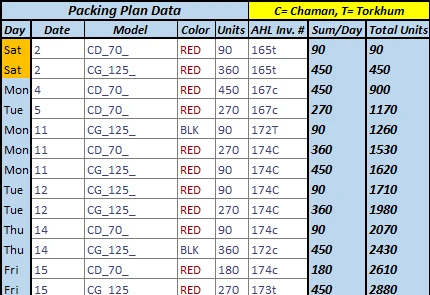
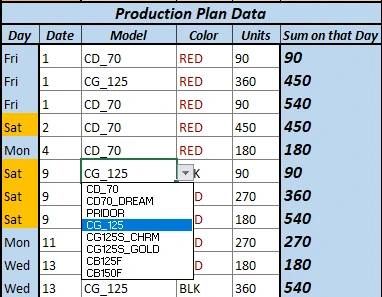
How the lot numbers are allocated
The core of the tool is a formula chain that works out which lot each packed unit belongs to, without anyone counting:
- Input the lotsLot number and the units in each lot.
- Input the packingWhen to pack and how many units.
- Running total madeTotal units produced up to that cell.
- Running total dueTotal units that should exist by each lot.
- MatchCompare the two and return the row where they meet.
- Return the lotRead the lot number from that row and write it under the units to be packed.
Error-proofing
- Lot size mismatch: if the units entered for packing don’t match the lot sizes, the sheet shows an error.
- Beyond the formula’s scope: entering more than 540 units in one cell raises a warning.
- Data validation on almost every entry cell, so most mistakes can’t be typed in the first place.
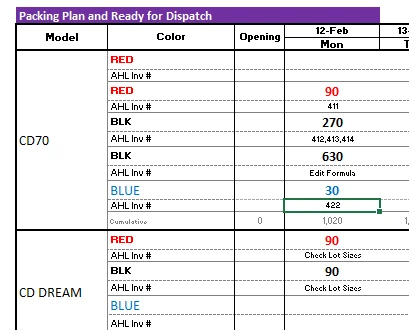
Known limitation, documented in the handover: packing for different invoices should go in separate cells. If that isn’t possible, the lot number is changed by hand in the invoice details sheet, which takes about 15–20 seconds.
Built with
Excel functions:
Excel tools: data validation for drop-downs and input rules, named ranges managed through Name Manager, and split view to keep the input area and schedule visible side by side.
Rollout and result
- Improvements & testingBuilt and tested as version 2.0 of the export file.
- TrainingPlanners trained on the new input area and checks.
- ImplementationWent live the following month.
- AdoptedBecame the standard export production and packing planning tool.
When the new version was first presented, the expected saving was about half the preparation time. Benchmarked afterwards with the same planner on both versions, preparation actually fell from a full shift to about an hour, and the single-person dependency went away.
The bigger benefit wasn’t the spreadsheet time. It was having more time to check whether the plan was feasible and to resolve production or material constraints.
Screenshots are close-ups of the input area and checks only. Full plan views with internal invoice and lot numbers are not shown.
Planning should turn complexity into action.
Open to Production Planner, Materials Planner, Production Controller and Supply Chain Planning roles in the UK.